Review Comments (4) Screenshots (6) Questions & Answers (7) Votes (429) Awards (2) Wiki  
-Please log in to rate
3.8 3.8/5 (429)
-Microsoft
-11.0
- office.microsoft.com
-Commercial
- 1 864 583 person
Download Microsoft... 11.0

37.52 KBDownloaded 10747 times


Review

Outlook is an e-mail management application from Microsoft that also provides calendar, task, contact management, note taking, journal, and Web browsing capabilities.
The application is part of the Microsoft Office suite. It can be purchased / installed on your PC as a stand-alone application, no matter whether the rest of applications of the MS Office suite are installed or not, and it can also operate in conjunction with Microsoft Exchange Server and Microsoft Office SharePoint Server for providing extended functionality in organizations. This includes shared calendars, public folders and more. The most important difference with the previous versions is that this one comes with a Navigation Pane with customizable shortcut buttons to quick-access Mail, Calendar, Contacts, Tasks, Notes, Folder List and any other functions you can think of.
Better known as Microsoft Outlook 2003, version 11 was first released on October 21, 2003, also bundled with Exchange Server 2003. It provides a webmail service called Outlook Web Access (OWA) of Microsoft Exchange Server 5.0 and later. The OWA interface resembles the interface in Microsoft Outlook, and is used to access e-mail, calendar, contacts, tasks, and other mailbox content when access to the Microsoft Outlook application is unavailable.
Advantages
  • Easy-to-use email client that provides several other functions
  • Provides a web client that provides the same basic functions as the desktop client
  • Multiple e-mail account handling
Disadvantages
  • Lack of security features compared to competitors in the market.

Reviewed by: Marcelo Viscarra

Reviewer rating: Editor's rating 4

Screenshots

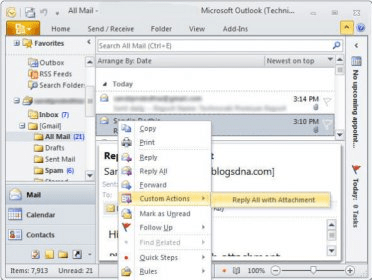
Predefined welcome e-mail from Microsoft Predefined welcome e-mail... Tools menu Tools menu Navigation Pane Navigation Pane Task Task
All 6 screenshots

Latest comments

Guest #6008798(beginner) 3 months ago 
Should be FREE with the OS!
Guest #261687(beginner) Last year 
I have more data not closing down correctly on this version than any other before. I close the application and shut the machine down and when I startup it has to go through data fixing almost everytime.
Bethrezen(fan) 6 months ago 
Looks like you've got an corrupt pst file. Try to run fix pst tool, or, creating a new pst file and importing your data. Hope i could help.
Guest #64007(beginner) Last year 
Excellent gadget that allows you to organise yourself!
Add new comment All 4 comments
Tag cloud Extensions
.iqy Microsoft Office Excel Web Query File
.oqy Microsoft Office Excel OLAP Query File
.rqy Microsoft Office Excel OLE DB Query files
.xla Microsoft Office Excel Add-In
.xlk Microsoft Office Excel Backup File
Download siClient

Email Address:

Password:

Register now »

Forgot password?

Copyright © 2009, Informer Technologies, Inc. About| Privacy and terms| Help| Feedback